The Panasonic Prestige Microwave and My Programming Paradigm
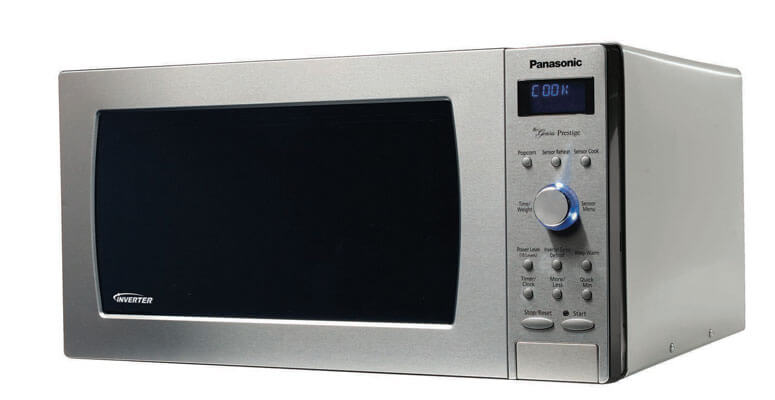
A few weeks ago, a new microwave appeared in the break room of the office I work at. It had a rather highfalutin name: The Genius Prestige. While I’m not sure it deserves such a fancy title, it has one peculiar feature. Instead of the numberpad of a standard non-prestigious microwave, it has a single dial. Usually, I’m a big proponent for keeping interfaces standardized. There’s no need to introduce a gimmick to an interface that people have been using for their entire lives.
However, in this case, the way the dial is implemented was incredibly clever. When I first tried to use it, I was surprised by how quickly and accurately I was able to set heat time. I thought that I’d just gotten lucky and landed on the time I wanted, so I tried again. I got the same result, and it honestly felt like the microwave was reading my mind (maybe that’s why it’s “The Genius”). Impressed but befuddled, I turned the dial one notch at a time to figure out what was going on. Starting from 00:00, the first 10 clicks of the dial increment the time by 1 second. Then from 00:10-00:30 each click increments by 5 seconds. From then on, every click increments by 10 seconds. The result is a dial that works nicely with how people usually use microwaves. At lower heat times, precision is more important, but as time increases we tend to estimate more. The difference between heating something for 5 seconds and 10 seconds may be significant, but the difference between 120 and 125 seconds is negligible.
As cool as that is, how does this microwave from the future relate at all to web development? While I marveled at the microwave’s design, I was reminded of Informatics classes in which we were asked to analyze user interfaces and suggest ways to make them more intuitive. Even though this isn’t a mouse and keyboard interface, it still would have been a great example. This was something designed with humans in mind – all humans, not just programmers or engineers. When designing a microwave’s timer function, the technical perspective tells us that users may want to set a timer anywhere from 1 second to 99 minutes and 59 seconds, and so we should treat all of those numbers equally. Of course, realistically this isn’t the case. As we discussed, people are far more likely to be specific with low times, and more general with higher times. The fact that this microwave’s designers recongized this gap between “computer thinking” and “human thinking”, then went the extra mile to accomodate that gap is incredibly admirable to me. That’s the type of mentality I want to have when I’m planning out a software solution.
The day after my microwave musings, I happened across a concrete example of this principle applied to web development. A site I was working on had a directory of bus stops. There were physical signs at these stops indicating what number they were, and there was also an online directory showing these numbered stops on a map. However, for one reason or another, one of the signs at a location (stop #3 of 4) had to be removed. The physical sign was removed, but when we also removed the stop from the online directory, we ran into a small bug. Removing stop #3 from the directory changed the numbering of the remaining pins on the map. Instead of being numbered 1, 2, 4 (as the signs were now numbered at the physical stop), the pins on the map read 1, 2, 3.
Resolving this bug was simple. Originally, the pins’ numbering had been implemented to be based on the stop’s index in the array of stops for that location. Removing stand #3 from that array shifted stop #4 so that it was the third item in the array, which also changed its pin label. Whoever had originally written the code made the (arguably perfectly reasonable) assumption that stops would always be numbered sequentially counting up from 1. I changed the pin labels to instead correspond to a database column indicating the stop number, which fixed the issue. Even though this was an incredibly simple fix, it ocurred to me that this was another example of human versus computer thinking. As a programmer, it makes a lot of sense to base the stop numbers off of their index in an array of stops. As a solution to the problem, “we need to number these pins starting from 1 and incrementing by 1 for each pin” it’s an elegant and easy to implement solution.
Unfortunately, creating software for a world full of messy humans means that our problem definitions are rarely that clean-cut. The unpredictability of people means that even the strangest edge case may someday become reality. Working on this problem showed me that to be an expert in human-computer interaction means so much more than just the literal user interfaces that humans use to interact with computers. It’s not just about shapes, colors, and colors. It goes all the way down to minute implentation details, like keying off of a database table column rather than an array’s index. At every stage of development, I should be seeking to create software that is resilient and enough to survive the realities of human interaction.
Going along this line of thinking, I realized how universally applicable the idea of “coding for humans” could be. The humans I’m coding for aren’t just users – that includes anyone who is even tangentially related to what I’m developing. This led me to what I’m now using as my personal paradigm for excellence as a developer:
Write code for humans. Make it intuitive for users. Make it readable and maintainable by other developers. Make it flexible enough to survive a project manager’s shifting requirements.
When I think about what constitutes “good code”, at the end of the day it all comes back to writing code while keeping the people involved in mind. There is a time and place for code golfing and writing clever solutions, but if the goal is to create a usable and maintainable product we can’t leave the humans out of the equation.